Telegram to MT5 Signal Copier: Can You Fully Automate It?
Telegram Signals to MT5: Can You Really Automate the Copy Process? The pitch sounds simple. Your provider posts a signal in Telegram, and it lands as a live trade in your MT5 account a second later — no phone, no order ticket, no missed entries. The question every serious trader asks before trusting it with real money is fair: does this actually work end to end, or does it fall apart the first time a provider posts something messy? The honest answer: yes, you can fully automate it — but only if the tool handles the three places where automation usually breaks. This walks through how a Telegram to MT5 signal copier works under the hood, where the failure points are, and how to set one up so it holds.

Daniel Brooks
Social Media Manager · August 7, 2026
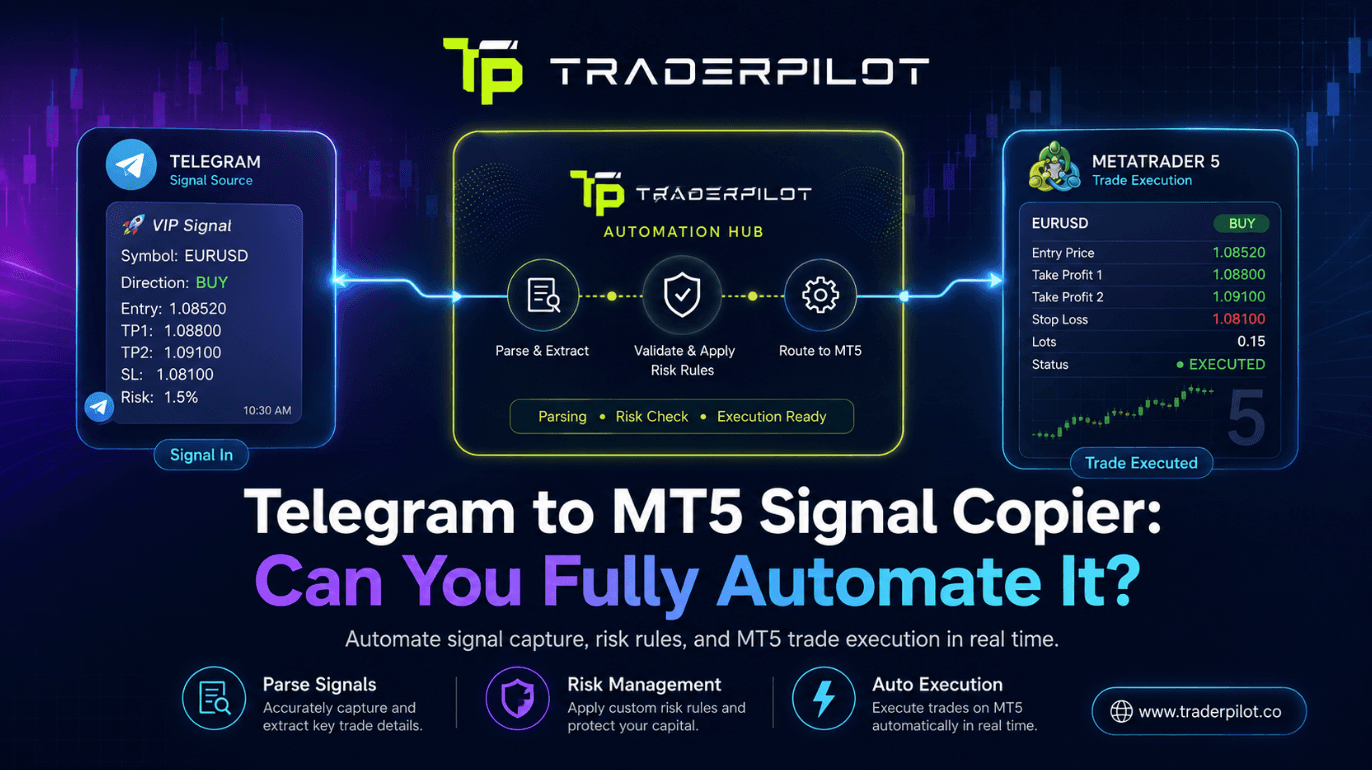
Table of contents
- What Is a Telegram to MT5 Signal Copier?
- The Three Jobs a Copier Has to Do
- Where Automation Usually Breaks
- 1. Messy signal formats
- 2. Symbol and suffix mismatches
- 3. Message edits and follow-ups
- How the Setup Actually Works, Step by Step
- Manual vs Automated: The Real Difference
- Common Mistakes When Automating Telegram Signals
- So — Can You Really Automate It?
- Frequently Asked Questions
- The Takeaway
- Automate your Telegram signals the right way
What Is a Telegram to MT5 Signal Copier?
A Telegram to MT5 signal copier is software that reads trade signals posted in a Telegram channel and executes them automatically on your MetaTrader 5 account. It monitors the channel, extracts the trade instructions from each message, and places the order on your broker account with your risk settings applied — no manual step in between.
The value is speed and consistency. Two subscribers can follow the same channel and get very different results simply because one acted in three seconds and the other in three minutes. A copier removes that human variance entirely.
The Three Jobs a Copier Has to Do
Automating the process comes down to three sequential jobs. Every one of them has to work, or the chain breaks.
- Listen — connect to the Telegram channel and detect new messages in real time.
- Understand — read the message and pull out symbol, direction, entry, stop-loss, and take-profit.
- Execute — translate those instructions to your MT5 account and place the order at your chosen risk.
Job one is easy. Jobs two and three are where cheap tools fall over.
Where Automation Usually Breaks
If you've tried a basic copier and had trades fail to fire, it was almost certainly one of these.
1. Messy signal formats
Real providers don't post like databases. One writes BUY GOLD 2350 SL 2345 TP 2360. Another posts xau buy now, stop below 2345. A third drops a screenshot with no text at all. A rigid parser that expects one exact format silently ignores everything else.
This is why parsing quality is the single most important feature in a copier — more than any dashboard. Tools that use AI-based language parsing read intent rather than matching a template, so free-form text, shorthand, and typos still resolve to a valid order.
2. Symbol and suffix mismatches
Your broker's symbol for gold might be XAUUSD, GOLD, or XAUUSD.m with a suffix. The provider's channel says "gold." If the copier can't map the provider's naming to your broker's exact symbol, the order rejects. A good copier lets you set symbol mapping so GOLD → XAUUSD.m happens automatically.
3. Message edits and follow-ups
Providers edit. They post an entry, then thirty seconds later edit the message to add a stop-loss, or send a follow-up: "move SL to breakeven," "close half." A copier that only reads the original message misses all of that trade management. The tool needs to track edits and follow-up instructions against the open position.
How the Setup Actually Works, Step by Step
Once you've picked a copier that handles the above, connecting it is straightforward:
- Link Telegram. Authorize the copier to read the channel(s) you follow.
- Connect MT5. Link your MetaTrader 5 account, usually via login credentials or a lightweight terminal connection.
- Map your symbols. Match provider naming to your broker's exact symbols and suffixes.
- Set your risk. Choose fixed lots or percentage-based sizing, plus any caps.
- Add filters. Optionally restrict by symbol, session, or maximum concurrent trades.
- Test on demo. Run it live-but-fake first to confirm it reads your specific providers correctly.
- Go live. Fund a small account and let it run, monitoring fills against posted signals.
The demo step isn't optional. It's where you catch a parsing quirk or symbol mismatch before real money is exposed.
Manual vs Automated: The Real Difference
| Factor Manual copying Telegram to MT5 copier | ||
| Speed to entry | 30 seconds to minutes | 1–2 seconds |
| Missed signals | Common (sleep, work) | Rare — runs 24/5 |
| Emotional interference | High | None |
| Trade management updates | Easy to miss | Applied automatically |
| Consistency across trades | Variable | Uniform |
The gap in "speed to entry" is the whole game. On fast-moving pairs, a two-minute delay can mean entering ten pips worse than the provider posted — enough to flip a winning signal into a loser on your account.
Common Mistakes When Automating Telegram Signals
- Skipping symbol mapping. The most common cause of "why didn't my trade fire?" Set it before going live.
- No risk cap. Automation places every signal. Without a per-trade risk limit and a global equity stop, one bad run compounds fast.
- Trusting one channel blindly. Automation amplifies whatever you point it at — including a provider on a lucky streak about to revert.
- Ignoring broker execution differences. Your fills won't perfectly match the provider's. Budget for spread and slippage differences between your broker and theirs.
- Not monitoring the first week. Automated doesn't mean unattended. Watch early fills to confirm the parsing is clean on your providers.
Expert tip: Before you commit, send the copier your three messiest providers on a demo account for a few days. If it reads those cleanly, it'll read the tidy ones. Judge the tool on your worst channel, not the demo's best case.
So — Can You Really Automate It?
Yes, fully — provided the copier solves parsing, symbol mapping, and message edits. Those three are the difference between a tool that demos well and one that survives real Telegram channels. Handle them, set your risk, test on demo, and the process runs without you.
The automation replaces your reaction time and your presence at the screen. It does not replace judgment about which providers to follow or how much to risk. That part stays with you — and it's the part that decides your results.
Frequently Asked Questions
Can I automatically copy Telegram signals to MT5? Yes. A Telegram to MT5 signal copier reads signals from your channel and executes them on your MT5 account within a second or two, with your risk settings applied. You set it up once, and it runs without manual input.
Do I need coding skills to set this up? No. Modern copiers are built for traders. You connect Telegram, link MT5, map your symbols, and set your risk — all through settings, not code.
What if my provider posts signals in a messy format? Basic copiers struggle with non-standard formats, but AI-based copiers use language parsing to interpret free-form text, shorthand, and typos. Test the tool against your specific providers on demo to confirm it reads them.
Why did my copied trade not open? The usual causes are a symbol mismatch (your broker's symbol name differs from the signal), a risk filter blocking it, or a message format the parser didn't recognize. Symbol mapping fixes most of these.
Will my results match the provider exactly? Closely, but not perfectly. Your broker's spread and execution speed differ slightly from theirs, so expect a small, consistent gap rather than an identical equity curve.
Is it safe to give a copier my MT5 login? Use a reputable tool and, where possible, a trading-only password rather than your master credentials. Start with a small account until you trust the execution.
The Takeaway
Automating Telegram signals to MT5 is entirely achievable, and a good copier closes the gap between a signal being posted and you being in the trade. The tools that work handle messy formats, symbol suffixes, and message edits — the three things that quietly break lesser copiers. Get those right, test on demo, and the process runs hands-free.
Automate your Telegram signals the right way
TraderPilot connects your Telegram channels to MT5 with AI parsing that reads real-world signal formats — messy text, screenshots, edits, and all. Map your symbols, set your risk once, and stop missing entries.